1. Home
  2. AI & Technology
  3. AI Voice Receptionists

AI & Technology

AI Voice Receptionists

Make every routine call easier to handle.

Explore AI voice receptionists designed to answer common questions, capture customer inquiries and connect callers with your team when human attention is needed. Built around your approved business information, existing workflows and clear handoff rules.

  • Answers only from information you approve
  • Clear rules for reaching a person
  • Designed around how your team already works
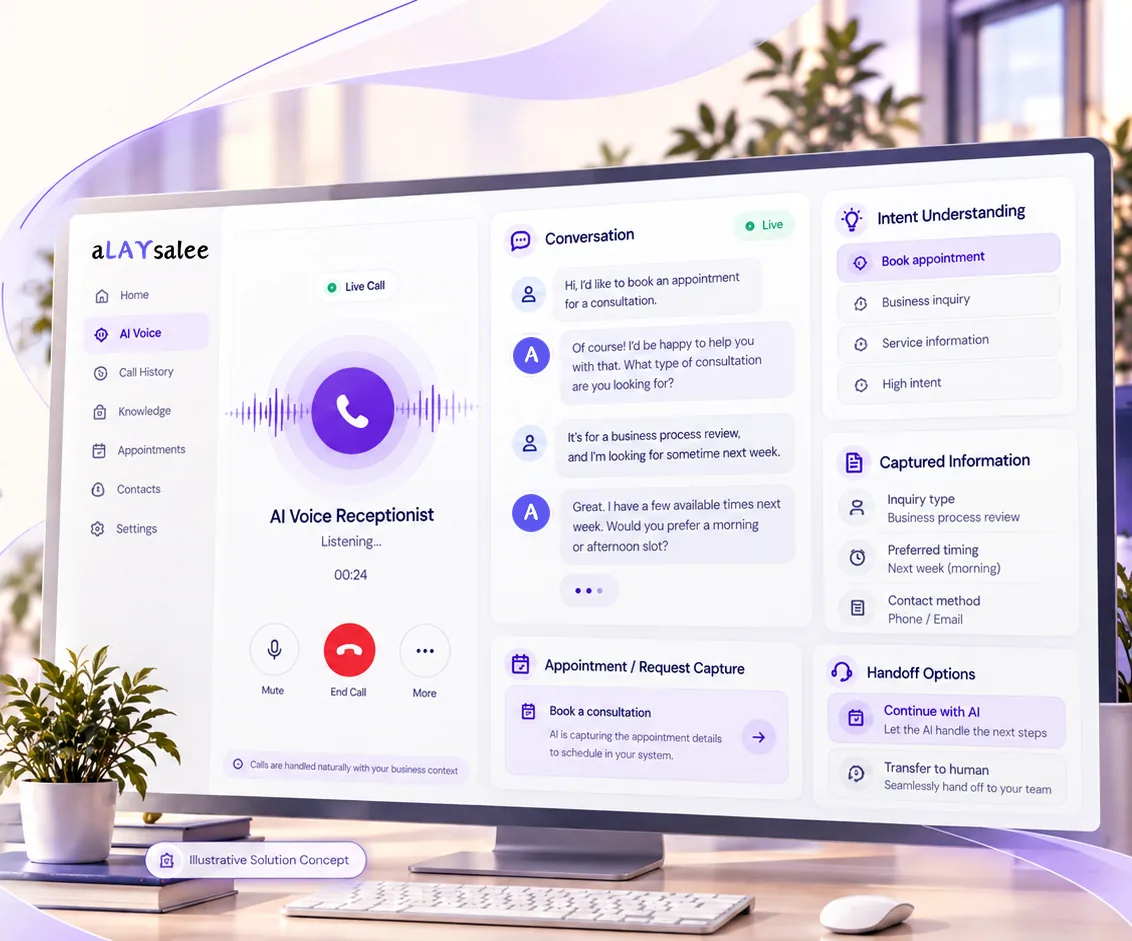
Illustrative AI voice receptionist screen: a live call with voice activity, a transcript of a caller asking about a consultation, detected intent, captured details and handoff options including transfer to a person.
Illustrative Solution Concept. An example call with fictional data. No appointment is booked; requests are captured for your team or your scheduling system.

The business problem

Where routine calls slip through

Calls rarely go unanswered because nobody cares. They go unanswered because the phone rings while everyone is on a job, with a customer or already on another line, and because the same few questions use up the time that more complex calls need.

  1. Missed calls

    When the phone rings during a job, a meeting or another call, it goes to voicemail. Some callers leave a message; others simply try the next business on their list.

  2. Repetitive inquiries

    Hours, service areas, what to bring, whether you handle a particular kind of job. Answering the same questions all day pulls people away from work that needs their judgment.

  3. After-hours requests

    A leak at 9 pm or an inquiry on a Sunday still deserves a clear response, even if the follow-up happens the next morning. A voicemail often lacks the details your team needs to act.

  4. Inconsistent handling

    Depending on who picks up, callers may get different answers, and details such as a callback number or the address of the job may never be written down.

How the receptionist works

From the first ring to the right person

Every call follows rules you agree in advance. The receptionist works from approved information and passes anything outside those rules to your team.

  1. A customer calls your business

    The call reaches the receptionist according to forwarding rules you choose: always, after hours, or when no one answers. It introduces itself as an automated assistant.

  2. It identifies the type of inquiry

    A general question, a new request, an existing customer or something urgent. Each type follows the path you agreed for it.

  3. It responds using approved information

    Answers come from a knowledge base your team reviews. If the answer is not there, it says so rather than guessing.

  4. It captures the relevant details

    For each call type it asks for what you defined: name, callback number, address or reference, and the reason for the call.

  5. The request is routed to your team

    By email, a team notification or a record in your CRM, depending on which connections are in scope for your setup.

  6. A person steps in when the workflow requires it

    When the caller asks for someone, the matter is urgent or sensitive, or the request falls outside its rules, it transfers the call or takes a message.

Sample call

Illustrative workflow
  1. AI receptionistThanks for calling Example Home Services. I’m the automated assistant, and this call may be recorded. How can I help?
  2. CallerHi, my kitchen sink is leaking under the cabinet. Can someone come out this week?
  3. WorkflowInquiry type: new service request
  4. AI receptionistI’m sorry to hear that. Is water still leaking now, or has it been stopped?
  5. CallerIt’s stopped. I turned the valve off.
  6. AI receptionistThank you. Could I take your name, the best number to reach you and the address?
  7. WorkflowCaptured: name, callback number, address, issue, preferred time
  8. CallerCan you just book me in for Thursday morning?
  9. AI receptionistI can’t confirm a time myself, but I’ll note that Thursday morning suits you and someone from the team will call to confirm. Would you rather I transfer you to a person now?
  10. CallerNo, a call back is fine.
  11. WorkflowRequest sent to the team. The booking stays with a person, as this workflow requires.
Illustrative workflow with a fictional caller and business. It shows how a call could flow; it is not a recording or a deployed system.

Wondering how your own calls would map onto this? Walk us through your current call flow

Real-world use cases

Where an AI receptionist might fit

Examples to help you picture your own calls. They describe where a receptionist might fit, not existing Alaysalee clients or deployments.

Home services and contractors

It might handle

Hours and service-area questions, new job requests with the address and a description of the problem, and callback requests after hours.

A person steps in for

Anything that may be an emergency, such as a gas smell, flooding or an electrical hazard; quotes and pricing; and complaints about completed work.

Professional service firms

It might handle

General questions about services and first steps, new inquiries sorted by type of work, and requests for an initial consultation call.

A person steps in for

Anything that could amount to professional advice, existing client matters, confidential details and fee discussions.

Property management

It might handle

Questions from prospective tenants about listings and viewings, and maintenance requests captured with the unit, the issue and access details.

A person steps in for

Urgent or emergency maintenance, rent or lease disputes, questions about eligibility, and anything involving a tenant’s personal circumstances.

Local appointment-based businesses

It might handle

Hours, location and service questions, appointment requests with preferred times, and messages about running late or needing to reschedule.

A person steps in for

Confirming or changing bookings unless that step has been approved and connected, payment questions and anything sensitive about a customer.

A good fit when you have

  • A steady volume of routine calls with predictable questions
  • Information you are comfortable having answered automatically
  • A person or team who follows up on the requests it captures

Capabilities and boundaries

What it can do, and where it stops

What it can be set up to do

  • Business FAQ answering

    Answers common questions from a knowledge base you review and approve, and says when something is outside it.

  • Lead information capture

    Collects the details you define for each call type, so follow-up starts from a complete request.

  • Call categorization

    Labels each call, for example new inquiry, existing customer, urgent or general, so it reaches the right place.

  • Follow-up requests

    Records callback requests with preferred times and passes them to the right person.

  • Human handoff

    Transfers the call or takes a message whenever a caller asks for a person or a rule says one is needed.

  • CRM integration, where supported

    Creates or updates records in your CRM when the system offers a suitable connection, confirmed during discovery.

  • Scheduling requests

    Captures preferred appointment times as requests. It confirms bookings only if you explicitly approve that step and your system supports it.

Integrations and workflow

Connected to the tools your team already uses

A receptionist is only useful if requests land where your team already works. Connections are designed for your setup during discovery, using the same approach as our workflow automation and custom software work.

AI receptionist and your rules

  • Phone system

    Usually call forwarding from your existing number, or a connection your phone provider offers. What is possible depends on your provider and plan, and we check it before recommending anything.

    Custom, scoped per project
  • CRM

    New requests can become contacts, leads or tasks if your CRM offers a suitable connection, such as an API. If it does not, a structured email or shared sheet is a practical start.

    Custom, scoped per project
  • Calendar

    Availability can be read to suggest times where your calendar allows it. Writing confirmed bookings is a separate step that you approve explicitly.

    Custom, scoped per project
  • Team notifications

    Your team can be told about new requests by email, text message or a team chat tool, with urgent calls flagged differently from routine ones.

    Custom, scoped per project

None of these is a pre-built integration or an off-the-shelf product. Each connection is custom work, scoped and tested against your actual systems before launch, and compatibility is confirmed only after that check.

Our implementation approach

Small, reviewable steps

A practical sequence with your team involved at every stage. Timing depends on the number of call types and the systems involved, so we estimate it after discovery.

  1. Discovery

    We look at how calls arrive today: who answers, which questions repeat, what gets missed and where each kind of call should end up.

  2. Workflow design

    Together we decide which call types the receptionist handles, what it may say, what it captures for each, and the exact rules for passing a caller to a person.

  3. Configuration

    The receptionist is set up with the knowledge base you reviewed, a greeting that discloses it is automated, the agreed capture fields and the connections in scope.

  4. Testing

    We call it ourselves with realistic and awkward scenarios, such as unclear requests, upset callers and questions it must not answer, and fix what we find before a customer hears it.

  5. Controlled pilot

    It goes live on a limited scope, such as after-hours calls or one call type, while your team reviews transcripts and the requests it captured.

  6. Improvement

    Based on the pilot, we adjust answers, routing and handoff rules, and widen what it handles only when you are comfortable.

Questions

Frequently asked questions

Something else on your mind? Ask us directly.

Can an AI receptionist work with my existing business number?

That is usually the aim. Calls are typically forwarded from your current number, either all the time or only in situations you choose, such as after hours or when no one answers. The exact options depend on your phone provider and plan, so we confirm them during discovery before recommending an approach.

Can callers request a real person?

Yes, and we design for it. A caller can ask for a person at any point, and the receptionist transfers the call or takes a message, depending on who is available and the rules you set. It should never keep a caller in a loop.

Can it capture leads outside business hours?

Yes. Out-of-hours calls can be answered, the details captured and the request sent to your team for follow-up, with calls flagged as possibly urgent passed on under your escalation rules. Callers are told when they can expect to hear back.

Can it schedule appointments?

By default it captures appointment requests with the caller’s preferred times, and your team confirms them. Booking directly into a calendar is possible only where your scheduling system supports it and you explicitly approve the receptionist making that commitment.

Can it connect to our CRM?

Possibly. It depends on whether your CRM offers a suitable connection, such as an API or a supported integration, and on what you want recorded. We check this during discovery. Where a direct connection is not practical, structured emails or a shared sheet are simple alternatives.

What happens when it cannot answer a question?

It says it does not have that information rather than guessing, records the question and the caller’s details, and passes them to your team or offers a transfer. Those unanswered questions also show which approved information is worth adding.

How do we handle privacy and call-recording consent?

Callers are told they are speaking with an automated assistant and, where calls are recorded or transcribed, hear a disclosure at the start. Consent rules differ between states and provinces, and some require every party’s consent, so before launch we agree the disclosure wording, what is stored, who can access it and how long it is kept. Your own legal adviser should confirm the final policy.

How long does implementation take?

It depends on how many call types are in scope, how much approved information needs preparing and which systems are connected. We give an estimate after discovery, and we recommend starting with a limited pilot rather than a full rollout.

Related

  • Custom AI Agent Development

    Agents that carry out one defined job inside your tools, with narrow permissions, approval gates and a full log.

  • Business Process Automation

    Routing, record updates, notifications and hand-offs between your tools, with AI only where a step needs interpretation.

  • AI Customer Support Agents

    Email, chat and help-desk assistants that answer from approved content and escalate with full context.

Next step

Your calls deserve a clearer workflow.

Tell us how your business currently handles incoming calls. We’ll help identify where an AI receptionist may fit—and where human support should remain.

Start a Conversation

We use these details only to reply to your inquiry. Nothing is shared or used for marketing. Privacy Policy

What is this about?

At least 20 characters.