1. Home
  2. AI & Technology
  3. Business Process Automation

Business process automation

Make Repetitive Work Move Without Constant Follow-Up

We map how a process really runs across your forms, inboxes, spreadsheets and business software, then automate the steps that are stable: routing, record updates, notifications and hand-offs. AI is added only where a step genuinely needs interpretation.

  • Deterministic steps stay deterministic
  • Failures are visible, never silent
  • Documented so it can be maintained

The problem

Where operational time quietly disappears

The drag usually lives in the gaps between systems rather than inside any one tool.

  1. Re-keying the same details

    Customer, order or job information is typed into two or three tools by hand, and the copies drift apart.

  2. Chasing status

    People ask “has this been done?” because the answer lives in someone’s inbox or memory.

  3. Approvals that stall

    A request waits for sign-off because the approver was never told it arrived.

  4. Reports assembled by hand

    Every week someone exports, pastes and formats the same numbers.

  5. Silent failures

    An existing script or connector stopped working weeks ago and nobody noticed.

A new lead, before and after

Illustrative

Before · manual hand-offs

  1. Form email lands in a shared inbox

    Someone notices it, sometimes hours later.

  2. Details re-typed into the CRM and a spreadsheet

    Two copies, two chances for a typo.

  3. Owner assigned by whoever is free

    No record of who picked it up or when.

After · one monitored route

  1. Step 1

    Website form submitted

    Fields validated at the source.

  2. Step 2

    Record created or updated in the CRM

    Duplicate check on email and company.

  3. Step 3

    Assigned by territory and service line

    Rules the team agreed, written down.

  4. Step 4

    Owner notified with a summary

    Email or team chat, with a link to the record.

Exception

Unclear or duplicate leads go to a review queue A person decides; the queue is visible to the team.

Illustrative process map with a fictional business. It shows the shape of an automated route; it is not a deployed integration.

The distinction that saves money

Most automation should not use AI at all

Copying a field from a form into a CRM, assigning an owner by territory or sending a reminder two days before a deadline are deterministic steps. Plain automation handles them reliably, cheaply and in exactly the same way every time.

AI is useful for the steps that need interpretation: reading a free-text message to decide what it is about, or pulling details out of an attachment. When a process has a step like that, we isolate it, give it a confidence check and a fallback, and keep the rest of the route predictable. If AI is the main part of the job, AI workflow integration or an AI agent may be the better fit.

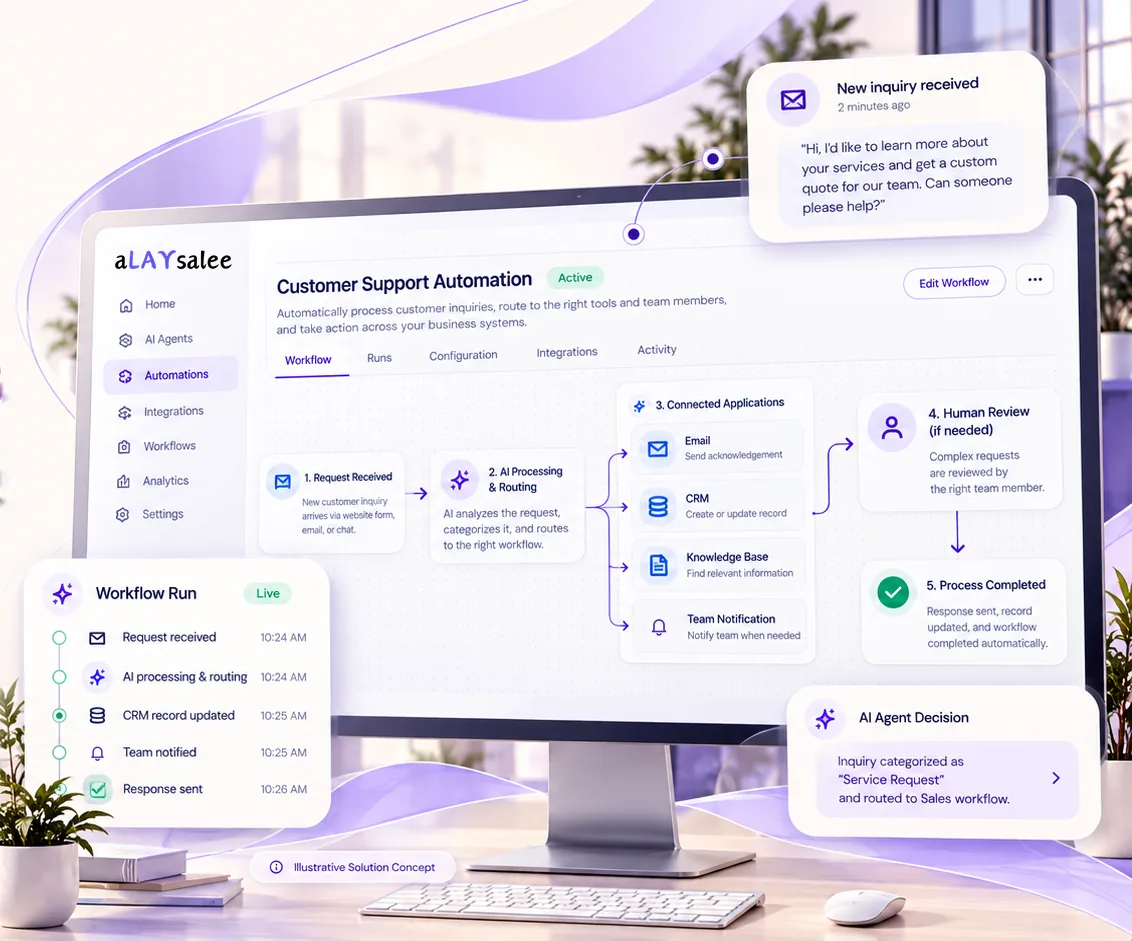
Illustrative workflow automation screen: a new inquiry triggers AI routing to email, CRM, knowledge base and team notification steps, with optional human review, a completion step and a timestamped run log.
Illustrative Solution Concept. A sample automation run with fictional data. Workflows are designed around your tools, data and approval points.

Scope and deliverables

What an automation engagement includes

The deliverable is a working, monitored route and the documentation to keep it running, not a collection of fragile one-off connections.

  1. Process map

    The current route, drawn with the people who run it, including the exceptions they handle informally.

  2. Target design

    Which steps become automatic, which stay manual and which need a person’s decision, with owners named.

  3. Field mapping

    How data moves between systems, which system is the source of truth for each field and how conflicts are resolved.

  4. Build with safeguards

    Retries for temporary errors, idempotency so a retried step never creates duplicates, and validation before writing.

  5. Failure alerts and a review queue

    Items that cannot be processed are held, visible and assigned, rather than lost.

  6. Runbook and handover

    What the automation does, how to pause it, how to fix common failures and who to call.

Example scenarios

Processes that often benefit

Fictional examples to illustrate typical routes. They are not Alaysalee clients, deployments or measured results.

Example · Lead routing

Situation

A home-services company gets leads from its website, a directory listing and phone messages, and assigns them in a weekly scramble.

What would be built

All sources feed one route: validate, de-duplicate, create the CRM record, assign by ZIP code and service, notify the owner and remind them if the lead is untouched after a set time.

A person stays involved

Leads that match two territories or look like spam go to the office manager’s queue.

Example · Client onboarding

Situation

A professional-services firm sends the same welcome email, folder setup and checklist for every new client.

What would be built

A signed agreement triggers the client folder, the project record, the welcome email with the right attachments and the first internal tasks.

A person stays involved

The engagement lead reviews the generated checklist before the client sees anything.

Example · Weekly reporting

Situation

An operations lead spends Monday morning pulling numbers from three tools into a spreadsheet.

What would be built

Scheduled exports are combined, checked for missing data and published to a shared report, with an alert if a source fails.

A person stays involved

The lead still writes the commentary; the automation only prepares the numbers.

Readiness

Automation readiness checklist

Answering these before discovery makes the estimate faster and more accurate.

  • The process runs at least weekly, and someone owns it
  • The systems involved and how you access them (admin rights, API, exports)
  • Which system holds the correct version of each piece of data
  • The exceptions people handle today, even informal ones
  • Who should be alerted when something fails
  • Any data that must not leave a particular system

Trust, security and oversight

Built to fail safely

Integrations change, APIs have outages and data arrives malformed. A good automation expects that.

  • Retries and idempotency

    Temporary errors are retried; repeated runs never create duplicate records or double notifications.

  • Visible exceptions

    Anything that cannot be processed waits in a queue with the reason, instead of disappearing.

  • Alerts to a named owner

    When a step fails repeatedly, a person is told, with enough detail to act.

  • Audit trail

    Each run records what changed, where and when, so questions can be answered later.

  • Manual fallback

    The process can continue by hand if the automation is paused for maintenance.

Fit

Good candidates, and when to wait

A good fit when you have

  • A process that runs at least weekly
  • Two or more systems involved
  • A named owner for the process

Probably not a fit when

  • The process changes every few weeks and has not settled
  • The underlying data is so inconsistent that it must be cleaned first
  • The main difficulty is a decision that needs expertise, not the movement of information
  • No one is responsible for the process once it is automated

Engagement approach

How an automation project runs

Timeline depends on the number of systems, steps and exceptions, so we estimate after mapping the process.

  1. Process mapping

    We map the current route with the people who run it, including the informal exceptions.

  2. Target design

    We decide which steps become automatic, which stay manual and where a person must decide.

  3. Mapping and build

    Field mapping, retries, idempotency and validation are built in from the start.

  4. Test and pilot

    The route runs on real but limited volume, with failures visible in a review queue.

  5. Document and hand over

    A runbook explains what it does, how to pause it and how to fix common failures.

Questions

Questions about workflow automation

Something else on your mind? Ask us directly

Will it work with the tools we already use?

Often, but it depends on how each tool can be accessed: an API, webhooks, a supported automation platform or scheduled exports. We check each system during discovery and tell you plainly where a connection is not practical. We do not claim compatibility before that check.

How long does an automation project take?

It depends on the number of systems, steps and exceptions involved. A single route between two well-documented tools is a small project; a process spanning several systems with approvals is larger. We give an estimate after mapping the process.

What if our data is messy?

Most data is. The mapping stage shows which fields are unreliable. Some issues can be handled with validation and a review queue; others are better fixed at the source before automating, and we will say which.

What happens when an automation fails?

It retries temporary errors, holds anything it cannot process in a visible queue and alerts the person responsible. Nothing should fail silently.

Who maintains it afterwards?

You receive documentation and a runbook, so your team or another developer can maintain it. Ongoing support from us is optional and quoted separately.

Do we need AI for this?

Frequently not. We recommend AI only for steps that need interpretation, such as understanding a free-text message, and keep everything else deterministic.

Next step

Which process do you keep chasing?

Tell us how the work moves today, which tools are involved and where it stalls. We will help map it and recommend what to automate first, and what to leave alone.

We reply by email. An inquiry is not a contract, and there is no obligation.

Start a Conversation

We use these details only to reply to your inquiry. Nothing is shared or used for marketing. Privacy Policy

What is this about?

At least 20 characters.